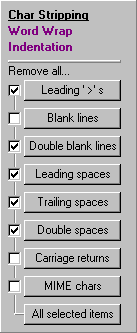
| The Char Stripping tool panel allows you to automatically remove (or strip)
specific character sequences out of the text in the edit pane. Note that the first 7 buttons are preceeded by a
check box and that there is a line connecting these 7 check boxes to the 8th button (All Selected Items).
By setting the check boxes and clicking the All Selected Items button, you can perform multiple character
stripping operations with one click. The 7 buttons : Leading '>'s, Blank
lines, Double blank lines, Leading spaces, Trailing spaces, Double spaces, Carriage
returns, and MIME chars are explained in in detail below. |
|
| The Leading '>'s button removes all of the '>'s at the beginning of each
line of text in the edit pane. Additionally, any spaces between '>'s are also removed. '>'s occurring later
in the text lines are not affected. |
----- Before -----
>> >     MessageCleaner is a utility designed to
>> > facilitate the cleaning of messy email and
----- After -----
     MessageCleaner is a utility designed to
 facilitate the cleaning of messy email and
|
| The Blank lines button removes all blank lines (duh!). Lines containing
nothing but spaces are considered to be blank. |
----- Before -----
Thanks for your help!

Take care!

John Doe
----- After -----
Thanks for your help!
Take care!
John Doe
|
| The Double blank lines button converts all instances of 2 or more blank lines
into a single blank line. |
----- Before -----
Thanks for your help!


Take care!

John Doe
----- After -----
Thanks for your help!

Take care!

John Doe
|
| The Leading spaces button removes all spaces at the beginning of every line
in the edit pane. |
----- Before -----
     MessageCleaner is a utility designed to
 facilitate the cleaning of messy email and
 newsgroup messages. If you've ever received

----- After -----
MessageCleaner is a utility designed to
facilitate the cleaning of messy email and
newsgroup messages. If you've ever received
|
| The Trailing spaces button removes all spaces at the end of every line in the
edit pane. Trailing spaces are rarely a problem, but they can be, so MessageCleaner removes them, just for good
measure. Note : in order to see the trailing spaces in the example to the right, highlight the text by dragging
the mouse over it. |
----- Before -----
    MessageCleaner is a utility designed
to facilitate the cleaning of messy email
and newsgroup messages. If you've ever
----- After -----
    MessageCleaner is a utility designed
to facilitate the cleaning of messy email
and newsgroup messages. If you've ever
|
| The Double spaces button converts all instances of 2 or more spaces into a single
space. |
----- Before -----
    MessageCleaner   is a utility designed
to   facilitate the   cleaning of messy email
and   newsgroup messages. If you've ever
----- After -----
 MessageCleaner is a utility designed
to facilitate the cleaning of messy email
and newsgroup messages. If you've ever
|
| The Carriage returns button strips all of the carriage return and line feed
characters from the text in the edit pane. If the Horizontal Scroll check box (below the tool panels) is
checked, the edit pane will appear as one long line. If the Horizontal Scroll check box is left unchecked,
the text in the edit pane will wrap to fit the edit pane's width. |
----- Before -----
MessageCleaner is a
utility designed to
facilitate the
cleaning of messy
----- After -----
MessageCleaner is a utility designed to facilitate
|
| The MIME chars button replaces those annoying =20 characters with their decoded
equivalent. |
----- Before -----
I'm using Outlook Express=20
----- After -----
I'm using Outlook Express
|